TCP vs UDP: When to Use What, and How TCP Relates to HTTP
Understanding TCP and UDP through real-world analogies, and how HTTP fits into the picture.
When you send a message over the internet, how do you know it arrives? Does it matter if it arrives? The answer depends on whether you’re using TCP or UDP — two different approaches to moving data across networks.
The Internet Needs Rules
Imagine the internet as a massive postal system. Millions of packages (data packets) are flying around every second. But without rules, chaos would ensue:
- Packages might get lost with no one knowing
- Some might arrive damaged
- Others might show up out of order
- A few might never arrive at all
TCP and UDP are the rulebooks for how data travels. They define the behavior — but they have very different philosophies.
TCP: The Reliable Phone Call
Analogy: A Important Business Call
Imagine you’re negotiating a million-dollar deal over the phone. You need to:
- Establish the connection first: “Hello, is this John?”
- Confirm receipt: “Did you get that last point?”
- Correct errors: “Wait, I think you misheard me…”
- Maintain order: “Let me go through these points one by one.”
TCP (Transmission Control Protocol) works exactly like this. It’s a conversation with guarantees.
What TCP Actually Does
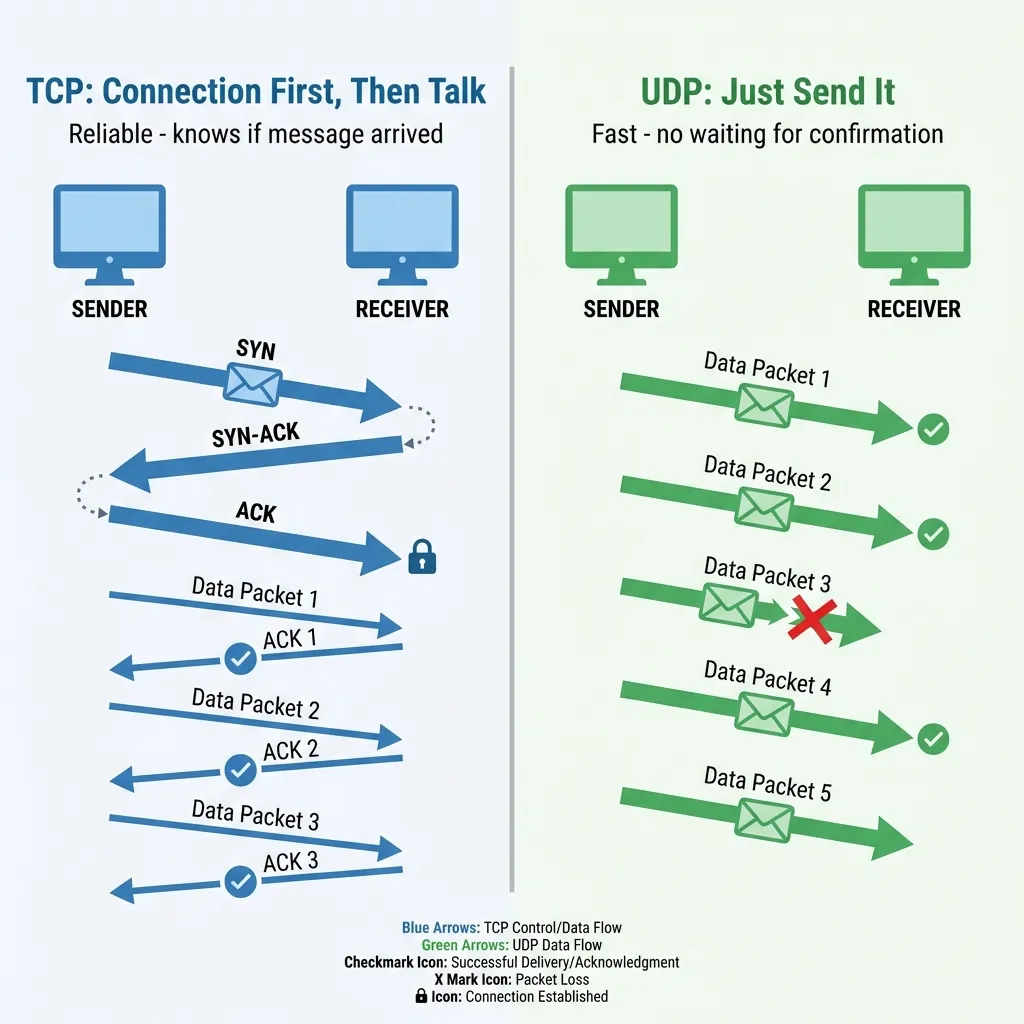
TCP’s Promises:
- Connection-oriented: Handshake before talking (“Are you there?”)
- Reliable delivery: Every packet is acknowledged (“Got it!”)
- Ordered delivery: Packets arrive in sequence (Packet 1, then 2, then 3)
- Error checking: Corrupted packets are retransmitted
- Flow control: Won’t overwhelm the receiver
The TCP “Conversation”
You: "Hi, can we talk?"          ← SYN (Synchronize)
Server: "Yes, I'm here!"         ← SYN-ACK
You: "Great, let's begin!"       ← ACK (3-way handshake complete)

You: "Here's page 1 of my data"  ← Packet 1
Server: "Received page 1!"       ← ACK 1

You: "Here's page 2 of my data"  ← Packet 2
Server: "Received page 2!"       ← ACK 2

[Packet 3 gets lost...]
You: "Here's page 3..."          ← Packet 3
[No ACK received...]
You: "Let me resend page 3"      ← Retransmission
Server: "Received page 3!"       ← ACK 3

You: "Goodbye!"                  ← FIN (Finish)
Server: "Goodbye!"               ← FIN-ACK
When to Use TCP
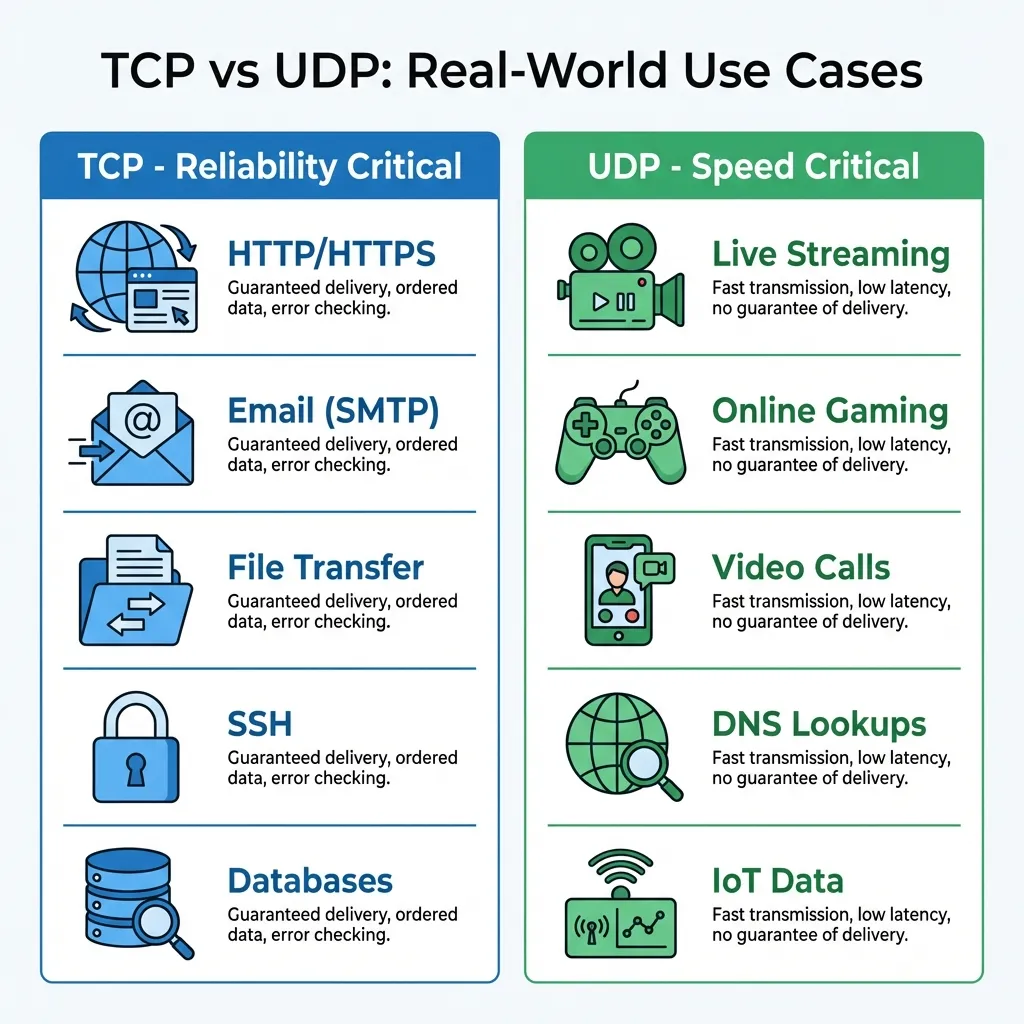
Use TCP when you cannot afford to lose data:
| Use Case | Why TCP? |
|---|---|
| Web browsing | HTML must be complete and in order |
| File downloads | Corrupted files are useless |
| Messages must arrive intact | |
| Database queries | Partial results break applications |
| Banking transactions | Missing data = lost money |
UDP: The Live Broadcast
Analogy: A Stadium Announcement
Imagine you’re at a concert and the announcer says: “The show starts in 5 minutes!”
- They don’t wait for everyone to confirm they heard it
- They don’t repeat it if someone was in the bathroom
- They just broadcast and move on
UDP (User Datagram Protocol) works like this. It’s a broadcast with no guarantees.
What UDP Actually Does
UDP’s Characteristics:
- Connectionless: No handshake, just send
- No delivery guarantee: Fire and forget
- No ordering: Packets may arrive out of sequence
- No retransmission: Lost packets stay lost
- Minimal overhead: Just 8 bytes header (vs TCP’s 20+ bytes)
The UDP “Broadcast”
You: "Here's some data!"         ← Packet 1 (sent)
You: "Here's more data!"         ← Packet 2 (sent)
You: "Here's even more!"         ← Packet 3 (sent, but lost in transit)
You: "And more data!"            ← Packet 4 (sent)

[Receiver gets packets 1, 2, and 4. Packet 3 is gone forever.]
[No one complains. No one retries. Life goes on.]
When to Use UDP
Use UDP when speed matters more than perfection:
| Use Case | Why UDP? |
|---|---|
| Video streaming | A missed frame is better than buffering |
| Online gaming | Old position data is useless; need current state NOW |
| Voice calls (VoIP) | Delayed audio is worse than dropped audio |
| Live sports broadcasts | Real-time over perfection |
| DNS queries | Small, fast; retry is cheap if needed |
Head-to-Head: TCP vs UDP
| Feature | TCP (The Courier) | UDP (The Announcer) |
|---|---|---|
| Connection | Requires handshake | No setup needed |
| Reliability | Guaranteed delivery | No guarantees |
| Order | Maintains sequence | Any order possible |
| Speed | Slower (checks + acks) | Fast (no overhead) |
| Error handling | Retransmits lost data | Ignores errors |
| Best for | Accuracy-critical apps | Speed-critical apps |
| Analogy | Certified mail with tracking | Megaphone announcement |
Real-World Examples
Example 1: Loading a Website
You type: example.com

1. DNS Lookup (UDP)
   "What's the IP for example.com?"
   → Fast, single packet, if lost we just retry

2. TCP Connection Established
   You ←────3-way handshake────→ Server
   "Let's establish a reliable connection"

3. HTTP Request (over TCP)
   You: "GET /homepage please"
   → Must arrive completely and in order

4. HTTP Response (over TCP)
   Server: "Here's your HTML..."
   → Every byte accounted for

5. More Resources (TCP connections)
   CSS files, JavaScript, images
   → All delivered reliably
Why TCP for web pages? Because a missing </div> tag or a corrupted image breaks the entire page.
Example 2: Netflix Video Streaming
Netflix Server → Your TV

Video Frame 1 ──► (arrives) ──► Displayed ✓
Video Frame 2 ──► (arrives) ──► Displayed ✓
Video Frame 3 ──► (LOST) ───► Skipped, Frame 4 shown instead
Video Frame 4 ──► (arrives) ──► Displayed ✓
Why UDP? Because showing Frame 4 immediately is better than pausing to retry Frame 3. You might see a tiny glitch, but the video keeps flowing.
Example 3: Online Gaming
Your Position: (100, 200)
     ↓ (sent via UDP)
Server receives: (100, 200)
     ↓
Other players see you at (100, 200)

[Next moment]
Your Position: (105, 205) ──► (packet lost)
Your Position: (110, 210) ──► (arrives)
Why UDP? Because knowing you’re at (110, 210) NOW matters more than knowing you were at (105, 205) a second ago. Old position data is irrelevant in fast-paced games.
Where Does HTTP Fit In?
Now for the part that confuses many beginners: What is HTTP, and how does it relate to TCP?
The Protocol Stack
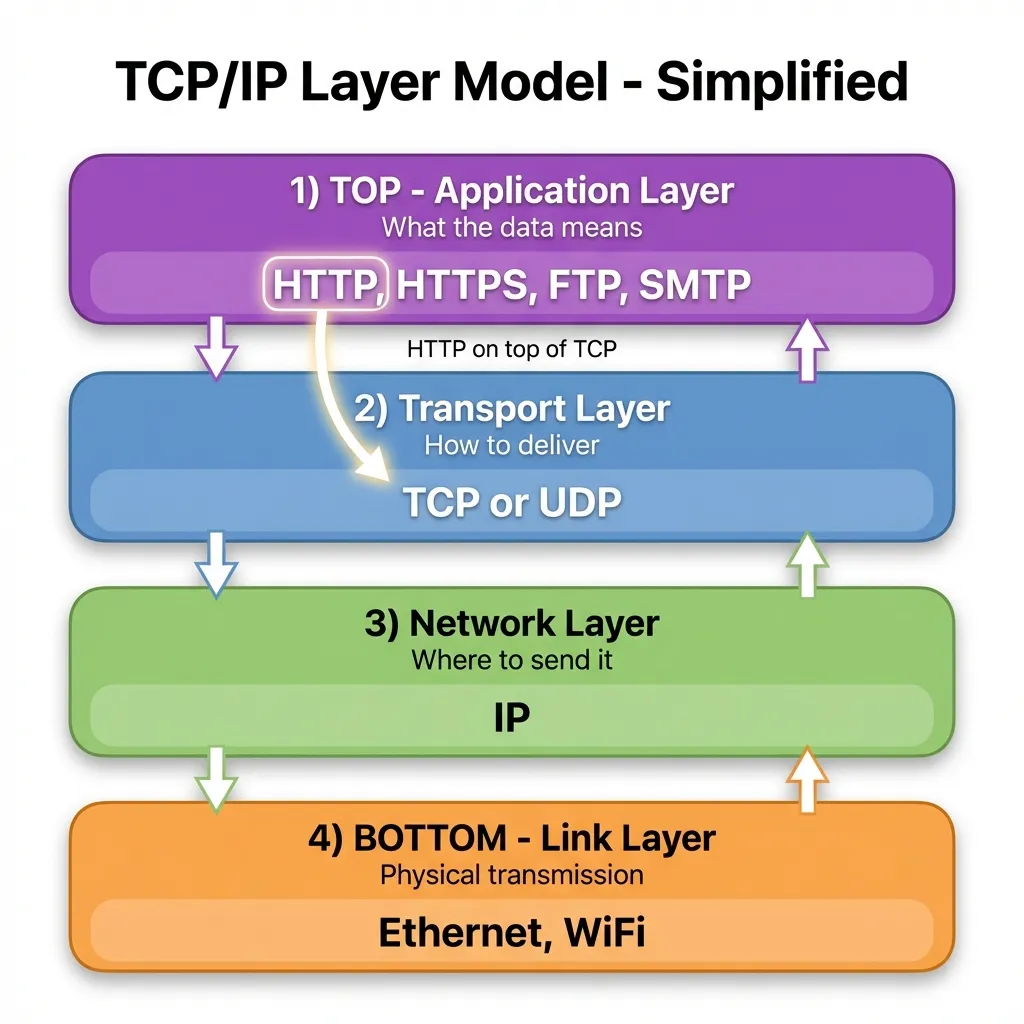
Think of network communication like mailing a letter:
┌─────────────────────────────────────┐
│  Layer 7: Application (HTTP)        │  ← "What does this mean?"
│  "GET /homepage"                    │     The content of your letter
├─────────────────────────────────────┤
│  Layer 4: Transport (TCP)           │  ← "How do we ensure it arrives?"
│  Connection, reliability, ordering  │     Certified mail service
├─────────────────────────────────────┤
│  Layer 3: Network (IP)              │  ← "Where does this go?"
│  Addressing, routing                │     The address on the envelope
├─────────────────────────────────────┤
│  Layer 1-2: Physical/Data Link      │  ← "How do we physically send it?"
│  Cables, WiFi, signals              │     The truck/plane carrying mail
└─────────────────────────────────────┘
HTTP is NOT TCP
HTTP (HyperText Transfer Protocol) is the language web browsers and servers speak. It defines:
- Request methods:
GET,POST,PUT,DELETE - Status codes:
200 OK,404 Not Found,500 Server Error - Headers:
Content-Type,Authorization, etc.
TCP is the delivery mechanism that ensures HTTP messages arrive intact.
The Relationship: HTTP Runs ON TOP of TCP
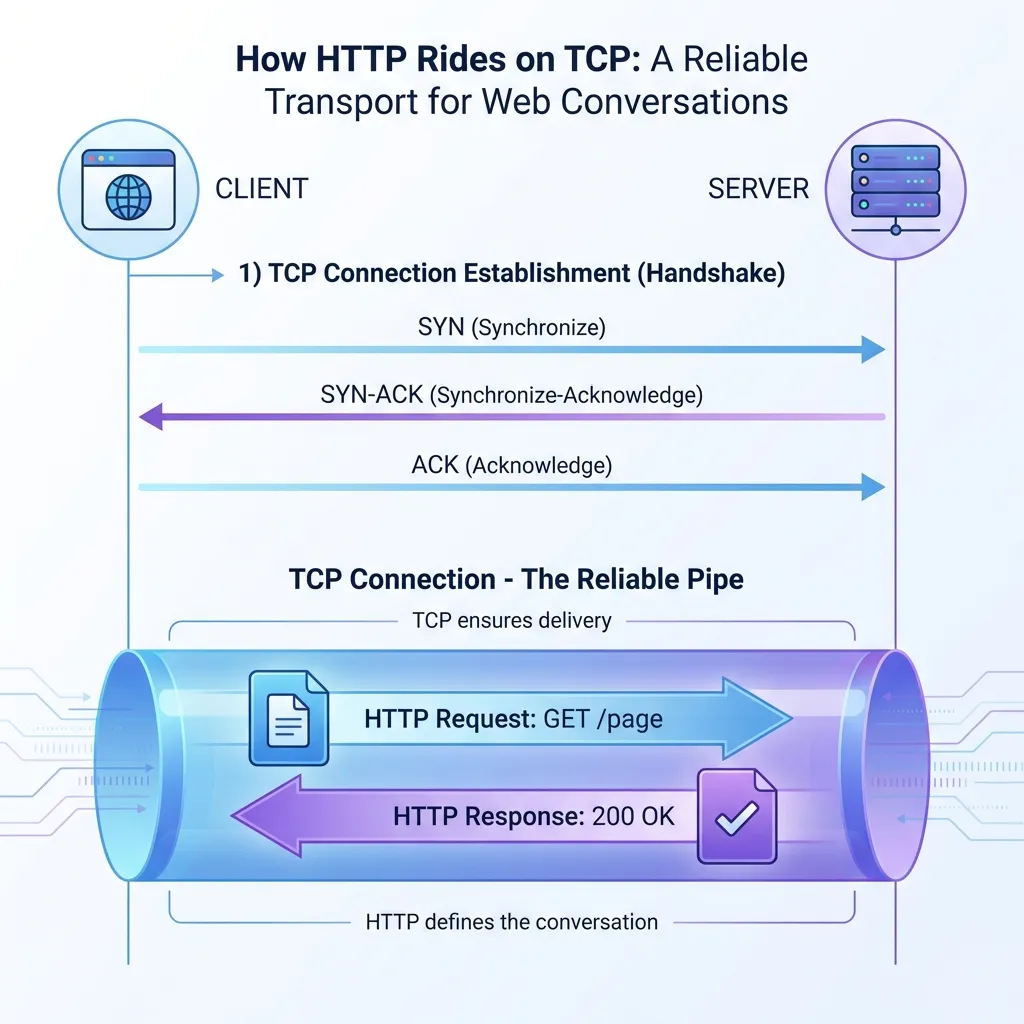
┌─────────────┐                    ┌─────────────┐
│   Browser   │                    │   Server    │
│             │  ←── HTTP ──→      │             │
│  "GET /"    │    (the message)   │  "200 OK"   │
└──────┬──────┘                    └──────┬──────┘
       │                                  │
       │  Uses TCP to send/receive        │
       ▼                                  ▼
┌─────────────┐                    ┌─────────────┐
│     TCP     │ ←── Connection ──→ │     TCP     │
│  (Transport)│   (the delivery)   │  (Transport)│
└─────────────┘ └─────────────┘Analogy:
- HTTP is like the language you speak (English)
- TCP is like the phone connection ensuring your words are heard clearly
You need both: Speaking English (HTTP) doesn’t help if the phone line (TCP) isn’t connected and clear.
Why HTTP Doesn’t Replace TCP
HTTP needs TCP because:
- HTTP is just text — It has no mechanism to ensure delivery
- Web pages must be complete — A partial HTML page is broken
- Resources arrive in order — HTML before CSS before JavaScript matters
Without TCP, HTTP would have to implement all the reliability features itself — and that’s exactly what TCP was built for.
HTTP/3: The Exception That Proves the Rule
You might hear that HTTP/3 uses UDP instead of TCP. This is true, but with a twist:
HTTP/1.1 ──► TCP ──► IP
HTTP/2   ──► TCP ──► IP
HTTP/3   ──► QUIC ──► UDP ──► IP
                ↑
         (QUIC adds reliability
          on top of UDP)
QUIC is a new protocol that runs over UDP but adds TCP-like reliability features. So even when HTTP uses UDP, it still needs reliability — it just implements it differently.
For beginners: Don’t worry about HTTP/3 yet. Most of the web still uses HTTP/1.1 and HTTP/2 over TCP.
Addressing Common Confusion
”Is HTTP the same as TCP?”
No! They’re completely different things working at different levels:
| HTTP | TCP |
|---|---|
| Application layer | Transport layer |
| Defines message format | Defines delivery method |
| ”What to say" | "How to ensure it’s heard” |
| Uses TCP | Used by HTTP, FTP, SMTP, etc. |
”If TCP is reliable, why ever use UDP?”
Because reliability has a cost: speed and overhead.
Imagine you’re live-streaming a concert:
- TCP approach: Pause the stream if a packet is lost, wait for retransmission, continue. Result: Buffering, delays.
- UDP approach: Skip the lost frame, keep showing the live feed. Result: Possible tiny glitch, but stays real-time.
”Can I choose between TCP and UDP?”
Usually, the choice is made for you by the application:
- Web browser → Uses TCP (HTTP)
- Zoom video → Uses UDP for video, TCP for chat
- Online game → Uses UDP for gameplay, TCP for login
As a web developer, you typically work at the HTTP layer and TCP handles the transport automatically.
Summary: When to Use What
Use TCP When:
- ✅ Data integrity is critical
- ✅ Order matters
- ✅ You can tolerate some delay
- ✅ File transfers, web pages, emails, databases
Use UDP When:
- ✅ Speed is more important than perfection
- ✅ Some loss is acceptable
- ✅ Real-time delivery is critical
- ✅ Streaming, gaming, VoIP, live broadcasts
Key Takeaways
- TCP is like a phone call: Reliable, ordered, but slower due to confirmations
- UDP is like a megaphone: Fast, no guarantees, but efficient for broadcasts
- HTTP needs TCP: Web pages must arrive complete and in order
- Different layers: HTTP (application) uses TCP (transport) for delivery
- Neither is “better”: They’re designed for different needs